

Hardware Setup
We recommend that you assign the custom commands which can all be found in the hardware configuration menu. Our commands are in the X-Crafts list.
Recommended useful commands
These are the ones we often use that you may not have set up by default.
Pop-up instruments (PFD, MFD, EICAS, FMS)
Cycle TRS modes to easily change TRS to the next available one.
Toga
Caution Warning (The airplane is annoying and will give you a lot of caution messages, just like in real life. Assign a button to this so you can easily silence it.)
Throttles
The throttles have a THRUST SET detent at the 0.85 position. It is important that you set your throttles into that position to use the TRS settings. If you push the throttles past this setting, you will always get MAX thrust.
We recommend that you create a flat segment of the response curve between 0.80-0.90 that will always return 0.85. This ensures you will have a buffer zone equal to the THRUST SET notch.
Speedbrakes
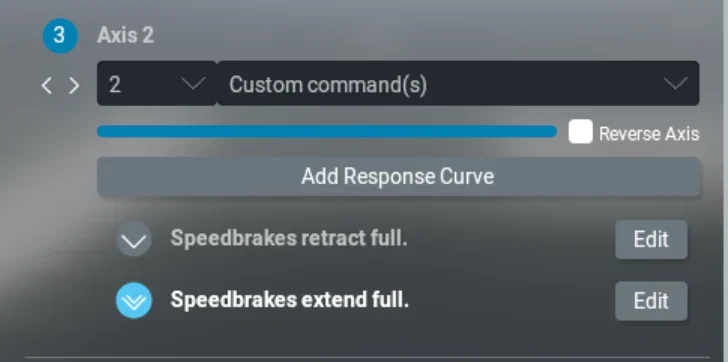
The default Speedbrakes joystick axis will not work. ERJs have only 2 positions on the speedbrakes handle - On or Off. So the correct joystick axis assignment is:
Select Custom command(s) from the dropdown (last option)
Select 2 from the dropdown left of Custom command(s)
Select the following commands - Speedbrakes retract full and Speebrakes extend full.
Flaps
The available flap settings are 0°, 9°, 22°, and 45°. Ensure that your hardware configuration gives you exactly those values.
Custom commands & datarefs
We do not have a list of custom datarefs or commands that we could share. However, you will be able to find any of them with the DatarefTool (DRT) plugin.
In X-Plane, open DTR and filter only changing values. Then click on a specific button, switch or lever in the cockpit and observe which datarefs or commands are changing.
If there are too many of them, you can also type a certain keyword into the search field. If you type “XCrafts”, you will see only our custom commands and datarefs.
Or you can type something related to the element, for example, if you want the flap lever, type “flap” in DRT. Then manipulate the flap lever and observe which commands or datarefs are being triggered.